Intro:
-
Simple Network Management Protocol is widely used for monitoring and managing networked devices, such as routers, switches, printers, servers and more.
-
It allows network admins to query devices for status information, configure certain settings and receive alerts or traps when specific events occur.
SNMP is an Application layer protocol that uses UDP
It involves 3 components:
- SNMP Manager: The system responsible for querying and interacting with SNMP agents on networked devices.
- SNMP Agent: Software running on networked devices that responds to SNMP queries and sends traps.
- **Management Information Base (BIS): ** A database that defines the structure of data available through SNMP. each piece of data has a OID.
Versions of SNMP:
- **SNMPv1: ** uses community strings for authentication.
- **SNMPv2c: ** An improved version with support for bulk transfers but still relying on community strings for authentication.
- **SNMPv3: ** Introduced security features, including encryption, message integrity and user-based authentication.
Ports:
- **Port 161 (UDP): ** Used for SNMP queries.
- **Port 162 (UDP): ** Used for SNMP traps (notification).
Enumeration:
use the -sC with nmap or run all snmp scripts from nmap using the wildcard *
nmap -sU -p 161 script snmp-* <target_ip>
- This script will show existing users on the machine that can be used for bruteforcing SMB or any other service.
Brute force:
We can brute force the community strings (password for authentication) using nmap:
nmap -sU -p 161 --script snmp-brute.nse
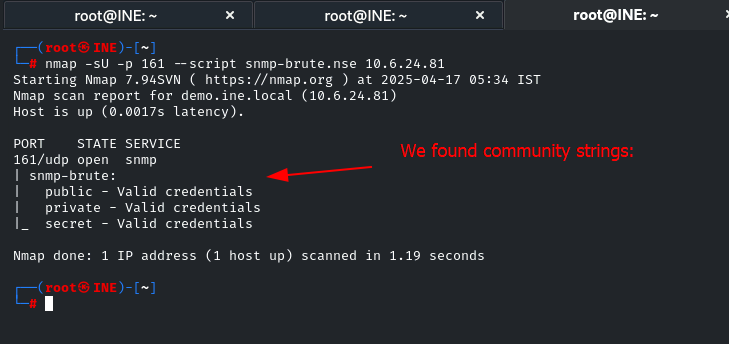
After we found community strings
snmpwalk -v <snmp_version> -c <community_strings_from_bruteforce> <target_ip>
E.g.
snmpwalk -v 1 -c public 10.6.24.81